The MIR CookbookChunhua Qi |
MIR is a software package to reduce data taken with the Smithsonian Submillimeter Array (SMA). The MIR package was originally developed by Nick Scoville at Caltech. It was written in IDL based on the OVRO calibration package MMA. The SMA adaptation of the MIR package was originated by Eric Keto, who also initiated the online data recording software dataCatcher to write the online data into MIR format, so MIR can be used to read and reduce the SMA data. Later more SMA-related routines have been developed by Chunhua Qi with the help of Mark Gurwell, Ken Young, Sheng-Yuan Liu, Kazushi Sakomoto, Qizhou Zhang and SMA postdocs and students.
The main advantages of MIR include:
The misfeatures of MIR are:
Nonetheless, the ease of programming, development, and debugging in the MIR package are expected to save time and effort.
The MIR format data have been stored in multiple places (see Section 2.1) which you can load into IDL and save a copy to modify. You can then examine, edit and calibrate the data. MIR will perform the gain (amplitude and phase), passband and flux calibrations. You can then export the data in a FITS file which can be read into mapping programs such as AIPS, DIFMAP or MIRIAD.
All the editting and calibration procedures are done in the IDL environment by typing idl at the unix or linux prompt 1. You will have to link the MIR package to IDL before entering IDL (see Section 2.2).
One important program is the dat_filter or its wrapper program select. The pointers set in this program filter the data you are using BEFORE the programs access the data. This means that all routines (plotting, calibrating, applying calibrations) will only work on the data that passes though this filter. One common mistake is to apply a calibration to a subset of the data, when you really wanted to apply it to all the data. If you get an error about no data found ALWAYS check the filter first (see Section 3.1).
For example:
     IDL> pro_hlp,variable=<'variable_name'>
             to get help on a variable.

     IDL> pro_hlp,structure=<'structure_name'>
             to get help on a structure.

     IDL> pro_hlp,/program
             to get help on a program and print out the basic
             introduction and usage of the function.

     IDL> mirhelp,'<task name>'
             to get help on a wrapper program, e.g. gain_cal etc.
The MIR package was originally meant to be driven by a graphical interface, and as a result, the function calls were designed for ease of use by another software package rather than by observers. At this time, The graphical interface is still under development, so to make the MIR package more convenient to use in the meantime, we have implemented a text interface to some of the MIR tasks. These are IDL "procedures" so there is no need for the "result=" which must precede the IDL "function" calls. The help files on those wrapper programs have not been implemented yet (will do later). Those wrapper programs are very convenient but very limited in function. If you want to get more hand on the real data, you might also try to use some function calls. The most important is dat_filter and its wrapper program select which we will discuss later in Section 3.1.
SMA interferometric data are stored in Hawaii (/data/mir_data/science or /sma/rtdata/science/mir_data on D2O, all the data before Year 2004 is stored in mir_data.pre2004) A copy of the data is also stored at CF machines (/sma/data04 but stopped at August 20th, 2004) and RG machine rglinux4 and rglinux6 (/pre_2006 for 04/13/2002-12/31/2005 and /2006 for 01/01/2006 +) at CfA. Each data set is stored in a file named according to the time of the creation. The naming convention for the file name is ’yymmdd_hh:mm:ss’. For example, a track for a project started at 01h47m28s UT on June 3, 2003 is stored in the directory ’030603_01:47:28’. In the directory, there are at least five files: bl_read, eng_read, scan_log, sp_read, codes_read, in_read, sch_read. ANTENNAS file contains the positions of the antennas.
The Radio Telescope Data Center (RTDC) has created a Web-based program to search for observations in the SMA raw-data archive. You may search the list by source name string or by right ascension, declination, and search radius. In addition, you may refine the search by selecting any combination of: frequency band, frequency resolution, minimum acceptable integration time on source, or date range. Upon viewing a list of all observations that meet the required criteria, you may then submit a request for the desired data, find the data yourself, or download the list of observations. The searchable list is updated weekly.
You don’t have to copy the data in your working area, I would suggest you use "readdata,dir=..." to load the data into IDL, giving the full absolute directory of the data and then use
IDL> mir_save, '<filename>'
to save everything into one datafile in your working area. Then when you want to read your raw data again , you just need to use
IDL> mir_restore,'<filename>'
to load everything back in IDL. This would save your time on data loading. You can use mir_save anytime before you want to exit from IDL, next time you will pick up anything and continue your calibration by mir_restore. This would save your time more. Sometimes you don’t want to save the whole data but only the positive weighting data, you can use "mir_save,/new" with the data filter setting, which will be discussed later in Section 2.2.
To set the environment variables with the paths to load the MIR library and startup files, source the following setup file.
(at Summit Linux D2O)
source /sma/local/mir/setup

(at Cf machine)
source /sma/mir/setup

(at rglinux4)
source /opt/mir/setup
The whole MIR package is only 1.5Mb. If you have a fast machine which runs idl. You can install MIR on your own machine. please check here for the latest MIR package. To install the MIR package, you need to extract the gzip/tar file to your own machine, and edit the setup file by changing RDXDIR(your MIR direcotry) and IDL_DIR(idl direcotry).
Before you type idl, note down your working directory. All the files saved will be in this directory unless you change your default directory within idl. Type
idl
to get in idl environment. The following command assumes that you are in idl environment:
IDL> readdata,dir='<directory>'
where <directory> will be the name of the data directory.
Sometimes the data is too large and you probably won’t need to load all the data into idl, then you can use readdata to load subset of mir data by band names and/or integration range
IDL> readdata,dir='<direcotry>', int=[100,200]
will load in the data with integration from 100 to 200.
IDL> readdata,int=[100,200],band=['c1','s01'],dir='<directory>'
will only load the data of band c1 and s01 with integration range of 100 to 200 into idl. In this way, users can just load the data they need into idl.
IDL> readdata,sideband='l', rx=345, dir='<directory>'
allows reading subsets of data. The above routines partly help data reduction if one is memory-limited in dealing with large datasets.
Change directories in IDL with the command
IDL> cd,'<new directory>'
Specifying the directory will change the default to the specified directory (the directory where the saved files and output fits files are).
Also You don’t have to copy the data in your working area, I would suggest you use "readdata,dir=..." to load the data into IDL, giving the full absolute directory of the data and then use
IDL> mir_save, '<filename>'
to save everything into one datafile in your working area. Then when you want to read your raw data again , you just need to use
IDL> mir_restore,'<filename>'
to load everything back in IDL. This would save your time on data loading. You can use mir_save anytime before you want to exit from IDL, next time you will pick up anything and continue your calibration by mir_restore. This would save your time more.
you can select the part of the data you need and save it to a smaller file. This feature will use the filtered header info and save the subset of data (data filtered by dat_filter or select to a dataset file which can be restored by mir_restore like:
     IDL> select,int=[100,200],band=['c1','s01'],/pos_wt,/reset
     IDL> mir_save,'savedatafile',/new
which will only save the data of band c1 and s01 with integration range of 100 to 200 into a datafile name ’saveddatafile’ on your local disk. It takes time to rewrite a new datafile. Be patient.
Since in IDL we load all the data into the memory, we could have a memory deficient problem. Please check Appendix A for ways to save memory.
Data inspection is very important for calibrating SMA data. Continuum (plot_continuum) and spectra (plot_spectra) must be plotted to make sure which part of data can be used. plot_var should be used for judging the tsys info as well as other variables related.
In this section, you will need to inspect data in graphics. For IDL on windows platforms, the color table is used differently from the solaris ones. To get the correct color displayed for windows and linux (or even on some solaris) users, try
IDL> device, decomposed=0, retain=2
before you plot. You need to close the window if you opened one already. See details in Section E.
Simply type
IDL> select
will print out all the basic information about the data.
The astronomical data sets are arranged in a tree structure. For a given track, there are three levels to this tree, corresponding to header information specific to integrations, baselines, and spectra. The three levels are contained in strucutres : in, bl, and sp. On top of the complete data set (generally a single track) one will generally want to apply a selection criteria for a particular data reduction operation (eg. all data with baseline 1-2 as indicated by variable blcd=’1-2’). We call this filtering the data set (by fuction dat_filter) and in order impliment it, in the programming, one should almost always access the data structures though index vectors pif, pbf and psf, a list of pointers in in, bl, and sp through the filter criteria (eg. source=’3c273’), i.e. pif refers to the pointers to ’in’, pbf to ’bl’, and psf to ’sp’. Part of data selection can also be implemented by wrapper program SELECT but it is very limited.
For example:
To select baseline 1-2 data:
     IDL> result=dat_filter(s_f,' "blcd" eq "1-2" ',/reset)
or
     IDL> select, baseline='1-2',/reset
In dat_filter, blcd is the variable name for baseline (use pro_hlp, variable=’blcd’ for details). Both above commands will set pointers pif, pbf, psf for baseline 1–2. With the pointers passed, we can print out all the useful info about the data for baseline 1–2, for example:
     IDL> print, in[pif].int
            to print the integration numbers

     IDL> print, bl[pbf].ampave
            to print the continuum amplitude

     IDL> print, sp[psf].tssb
            to print the tsys values
The other useful variable names are sb for sideband; int for integration number; band for spectral band; tssb for system temperature; wt for data weighting; fsky for sky frequency; dhrs for ut time; ampave for continuum amplitude; phaave for continuum phase. Use pro_hlp, structure=’in’ or ’bl’,’sp’ to find out which variable can be used along with pif, pbf, psf.
The restricted data set be constructed with one call with a compound selection clause or by successive calls (once for each selection restriction) without /reset.
Data selection criterion can be stacked as:
     IDL> select,band='c1',/reset
or
     IDL> select,baseline='1-2'
is similar to
     IDL> select,band='c1',baseline='1-2',/reset
or
     IDL> result=dat_filter(s_f,' "band" eq "c1" and
                         "blcd" eq "1-2" ',/reset)
which select all the continuum band of baseline 1-2 data, but
      IDL> select,baseline='1-2'
      IDL> select,band='c1',/reset
will select all the continuum band. /reset in the second command will reset the filter, ignoring all the previous filter setting.
Here we put some examples of data selection with both dat_filter and select (if possible) which could be very useful for flagging data points and data calibration: (I put /reset for all the cases to reset the filter and /pos_wt for good data with positive weights)
     IDL> select,/pos_wt,/reset
or
     IDL> result=dat_filter(s_f,' "wt" gt "0" ',/reset)
For SMA data, all the bad data will be flagged by setting their weights to negative values. Using the above selection, you will be prevented from using the bad points. So this selection will be a fundamental one for data calibration.
     IDL> select,int=[50,200],/pos_wt,/reset
or
     IDL> result=dat_filter(s_f,'"int" ge "50" and
                  "int" le "200" and "wt" gt "0"',/reset)
     IDL> select,sideband='u',band='c1',baseline='4-5',
                                /pos_wt,/reset
or
     IDL> result=dat_filter(s_f,' "sb" eq "u" and "band" eq "c1"
                  and "blcd" eq "4-5" and "wt" gt "0" ',/reset)
     IDL> select,ant='4',/p,/re
or
     IDL> result=dat_filter(s_f,' "blcd" like "4" ',/reset)
     IDL> select,rx=690,/p,/re
or
     IDL> result=dat_filter(s_f,' "rec" eq "690" and
 "wt" gt "0" ',/reset)
     IDL> result=dat_filter(s_f,' "tssb" gt "1000" ',/reset)

      no corresponding 'select' procedure.
     IDL> result=dat_filter(s_f,' "integ" lt "15" ',/reset)

      no corresponding 'select' procedure.
     IDL> result=dat_filter(s_f,' "ampave" gt "0.5" ',/reset)

      no corresponding 'select procedure.
After setting the filter, if you see "DANGER ! DANGER ! ...", this means something is wrong with your select command. If you ignore such message, all the commands after will work on the whole data points. If you use flag command, then you might flag all the data points !
IDL> select, ant='-3',/p,/rewill select all baselines which are not related to ant 3.
This works for all items (baseline, antenna, source, rx, sideband, band) except integration. Here is the final example:
IDL> select, baseline='-4-5',ant=['4','5'],source='omc',/p,/re
will select all data with ant 4 and ant 5 but without baseline 4-5 and source name starting with ’omc’ e.g. omc1 and omc2 etc if available.
dat_filter is a powerful but dangerous function to use. Use
IDL> pro_hlp, 'dat_filter'
to find out more.
Before you do any plotting, you should first make sure whether this is any continuum visibility recorded in your data track. There was a secret problem of SMA data that continuum visibility is recorded as 0 when we use 2 (or more) blocks. Please note that even you can plot the continuum by (plot_continuum), this doesn’t necessarily mean that you have the continuum visibility recorded because plot_continuum plots only the header information (bl.ampave and bl.phaave), but not the visibility. To find out the problem:
     IDL> select,band='c1',/pos_wt,/reset
     IDL> print,ch[pcf[0:20]]
if the print out are all complex numbers of 0s, then you have to recalculate the continuum visibility by averaging all the spectra bands (before using uti_avgband, check the spectra first to see whether there is any bad spectral band):
     IDL> select,/pos_wt,/reset
     IDL> uti_avgband
The default is using all spectral bands to regenerate continuum. You can also specify individual bands to regenerate continuum by
IDL> uti_avgband,band=['s09','s10',....]
Please note that the band number was once named as "s9", "s10"... rather than "s09", "s10"... Please use select to check the band names.
Users can specify some certain channel range to be used to generate continuum, e.g.
IDL> uti_avgband, chstart=64, chend=128
will generate the continuum band by averaging all the bands with channel numbers from 64 to 120 for each band.
Even though you don’t have continuum visibility problem as mentioned above, We have still some data problems when crates drop out during the track (as shown in Log Entry 6609). Current the correlator software will automatically fix the problem but still those flat line spectra stayed in the raw data.uti_avgband also can check each chunk for bad data, reports them to the screen and automatically flags them out before averaging useful spectral bands to generate the continuum band. So it would be always good to run uti_avgband at the beginning for checking bad crates in the dataset.
There is NO restriction on same band numbers for each baseline, which was required by the old version earlier than 20061020. All filtered spectral bands will be used as default, so you can set elaborate filters before using uti_avgband to get the continuum you need. Here is an example if you have a strong line in upper sideband S15 which you don’t want to use for regenerating continuum for a specific source. After you finish regenerating continuum for all sources, you can do the following to regenerate the upper sideband continuum for the source with strong line in band us15:
     IDL> select,/pos_wt,/reset,source='...',sideband='u',band='-s15'
(or simply IDL> result=dat_filter(s_f,'"source" eq "..." and "sb" eq
     "u" and "band" ne "s15" and "wt" gt "0"',/reset) )

     IDL> uti_avgband
You might consider to use uti_subcont to subtract continuum at the end of calibration before outputing for imaging. Check Section 6 for details.
Prior to calibrating, it is a good idea to have a look at the variation of the continuum amplitude and phase. The command plot_continuum is a wrapper for the MIR function plo_cont.
Calling plot_continuum with no arguments will default to plot amp,pha vs hours for each integration w/ separate panels for combinations of baseline, receiver, sideband and continuum band, and a maximum of 4 plots per page. The sources will appear in different colors. Yellow boxes indicate flagged data. If you include /no_unwrap in the arguments this will turn off the phase unwrapping. The frame_vars combination ’blcd, rec, sb, band’ is a single string and not a list. Same for the y_vars combination ’amp, pha’.
So
IDL> plot_continuum
is the same as
     IDL> plot_continuum,x_var='hours',y_vars='amp,pha',
               frame_vars='blcd,rec,sb,band', color_vars='source',
               symbol_vars=0,frames_per_page=4
There is a mouse click flagging option which appears following the first page.
If you select "f" for flagging by mouse clicks, you will be presented with the options:
*** use left mouse button to select data point
*** middle to deselect, right to quit
Use the left or middle buttons to click on the plot in either the amplitude or phase windows. The display does not change as you select points. The display is only redrawn once you click the right button to quit. Then the newly selected points will appear boxed, and you can check your work to make sure that you have selected the correct points. After you quit with the right button it is always possible to resume flagging by following the directions on the terminal (click middle button then type "f" ).
Below are some examples:
     IDL> select,/pos_wt,/reset
     IDL> plot_continuum,x='int'
will plot the continuum vs integration numbers for all the good data.
To check data quality for gain calibrators e.g. nrao530:
     IDL> select,source='nrao530',/pos_wt,/reset
     IDL> plot_continuum
Good data on a strong calibrator should show small phase and amplitude scatters, and slow temporal variations. Flag outliers in phase and amplitude.
Check other gain calibrators if you have any. It is also good to check the amplitude change with hour angle (HA) or elevation(EL) by using plot_var (see Section 3.5.
The plot_spectra command can be issued with no arguments to plot the amplitude and phase of the data as a function of channel number. This command drives the MIR function plo_spec. Different sources, baselines, bands, and sidebands can be assigned different frames, colors, and symbols. Even so, plotting all the data might produce a complicated plot. Use the select command to limit the data.
With no arguments, plot_spectra defaults to the following selection:
     IDL> plot_spectra,x_var='channel',y_vars='amp,pha',
              frame_vars='blcd', color_vars='sb',frames_per_page=4
will default to plot amp,pha vs channel numbers with separate panels for baseline and a maximum of 4 plots per page. The sidebands will appear in different colors. Follow the directions which appear for mouse clicks and commands for more options such as zooming and hardcopy.
Another example:
     IDL> select,source='mars',/pos_wt,/reset,sideband='u'
     IDL> plot_spectra,x_var='fsky', color='band', frame_vars='blcd'
will plot the spectra for mars, with x coord in sky frequency and separate panels for baseline. The bands will appear in different colors.
Check if you have good S/N at all baselines. Watch for any bad spectra band with all 0s in phase or amplitude.
By selecting different frame_vars, you can plot the spectra in different styles, for example:
IDL> plot_spectra,frame_vars='sb',ntrim=5,x='velocity'
will plot the spectra averaged over all the baselines.
The plot_var command can be used to plot the variables within the dataset. It also prints out the available plottable variables. The command plot_var is a wrapper for the MIR function plo_var. By default, plot_var plots elevation vs tsys for each baseline with color set for different sources. Everytime it will print out the variable names in MIR which could be plotted in principle. So
IDL> plot_var
is the same as
     IDL> plot_var , x='el', y='tssb',frame_vars='blcd',
                    color_vars='source',frames_per_page=4
Again, like in plot_continuum and plot_spectra, Different sources, baselines, bands, and sidebands can be assigned different frames, colors, and symbols. You can set x and y to the variable names (with quote) to plot variables.
No data averaging can be done with plot_var like plot_spectra. But of course you will get crazy plots if you plot it blindly. Some variable plotting needs to use the select command to limit the data. If you don’t understand the names of those variables, use pro_hlp to find out the meaning:
IDL> pro_hlp, variable='tssb'
Here pro_hlp should tell you that ’tssb’ should mean single sideband tsys temperature. But we only have double sideband temperature displayed now.
Like we discussed in Section 3.3, it is also good to check the amplitude change with hour angle (HA) or elevation (EL):
     (amplitude vs elevation)
     IDL> plot_var,x='el',y='ampave'

     (amplitude vs hour angle)
     IDL> plot_var,x='ha',y='ampave'
To check the amplitude vs projected baseline
IDL> plot_var,x='prbl',y='ampave',frame_var='sb', color='band'
It’s always an good idea to use this to check the amplitude of the gain calibrator.
To plot UT time vs tsys with frames in baseline and sideband
IDL> plot_var,x_var='avedhrs',y_var='tssb',frame_vars='blcd,sb'
As you will find later, SMA tsys values might be very unstable and that’s why we set the plotting default to be tsys vs elevation. More topics about tsys will be discussed in Section 4.
In addition to flagging individual data points by mouse clicks in the plot_continuum command, data can be flagged by setting the filter followed by the the flag command:
IDL> flag,/flag
This sets the weights (integration time/Tsys2) to negative.
If the SMA tsys hardware is not working reliably, sometimes it might be better to set all the weights to unity. Positive weights are set to unity and weights which were previously negative are set to negative unity:
IDL> flag,/unity
Data can be unflagged
IDL> flag,/unflag
To flag all the ipointing data which have integration time shorter than 30 seconds:
     IDL> result=dat_filter(s_f,' "integ" lt "30" ',/reset)
     IDL> flag,/flag
Don’t confuse with the next command:
     IDL> result=dat_filter(s_f,' "int" lt "30" ',/reset)
     IDL> flag,/flag
which will flag all the integration from 0 to 29.
Remember, flag will only work on the data constrained by the filter programs either dat_filter or select. If you choose a wrong selection criterion, and the " danger..." message appears, all the data pointers will be passed. A following flag will flag out all the data, which you don’t want.
The SMA records Tsys for each baseline and spectral band as the geometric mean of Tsys from the two antennas of the baseline. The mean Tsys is stored in the MIR header variable sp.tssb. Currently there is only one total power detector for each antenna and it reads only the broadband power from the receiver. Therefore, Tsys at the SMA is the same for each band (chunk) belonging to an integration and baseline. plot_var can be used to check system temperature measurements:
     IDL> select,/pos_wt,/reset
     IDL> plot_var, x='el', y='tssb'
Tsys should be a smooth varying function of elevation. If Tsys measurements are out of the norm, one should consider flagging the bad points. e.g. flagging out all the tsys larger than 1000 K
     IDL> result=dat_filter(s_f,' "tssb" gt "1000" ',/reset)
     IDL> flag,/flag
Tsys values are important in SMA data calibration since they are directly related to the visibility weights which scale as 1/Tsys2 and also the amplitude calibration after apply_tsys (Section 4.2) where we multiply tsys with amplitude. Sometimes especially in older tracks there were some bad tsys values recorded but the corresponding data were actually useable. Unfortunately the bad tsys values would affect their weights. There are two ways to fix the tsys values if you understand what you are doing, i.e. you know it is not the problem of data itself but the tsys detector :
     IDL> select,baseline='1-2',/reset
     IDL> t1=sp[psf].tssb
     IDL> select,baseline='1-3',/reset
     IDL> t2=sp[psf].tssb
     IDL> select,baseline='2-3',/reset
     IDL> t3=sp[psf].tssb
     IDL> select,baseline='1-4',/reset
     IDL> sp[psf].tssb=(t1+t2)/2.
     IDL> select,baseline='2-4',/reset
     IDL> sp[psf].tssb=(t1+t3)/2.
     IDL> select,baseline='3-4',/reset
     IDL> sp[psf].tssb=(t2+t3)/2.
It can be expanded to any antenna numbers.
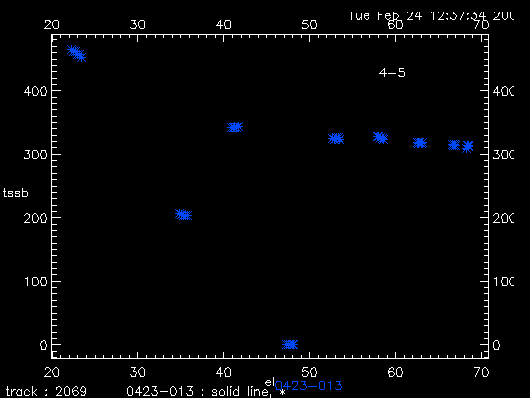
Sometimes tsys values are not bad for the whole baseline but only a few data values, as shown in Figure 1.
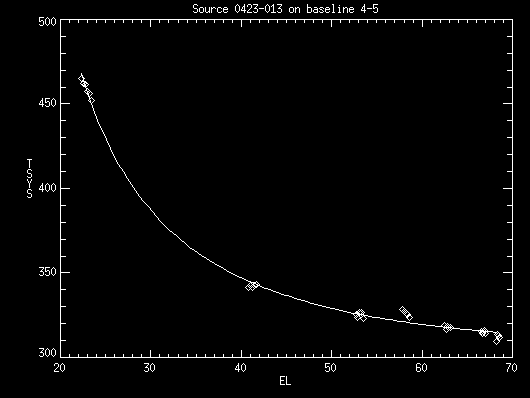
Figure 1 has already ignored all no-tsys points (i.e. those absurd high points), but still some bad tsys values around el 30-50 exist. Those points, along with no-tsys points are not real, judging from the other nice clustered tsys values. You can use uti_tsys_fix (antenna-based) or uti_tsys_cor (baseline-based) to correct those bad tsys points according to the correlation between the el and tsys:
| Tsys∼ F(Trx+Tsky)+exp |
| +cons. (1) |
F(Trx+Tsky) is the linear function of receiver temperature and atmospheric temperature. So we can actually fit the el vs tsys, giving the atmospheric tau is very constant. Of course we need to ignore the obvious outliers (e.g. those no-tsys points) in order to get reasonable fit, and we determine the bad points if the difference of the tsys with the fit function is larger than a fixed value (I call loose value). Then we can replace those bad tsys points with the fitted result.
To call the new tsys correction program:
     IDL> uti_tsys_fix,tel_bsl='telescope'
           (,high=1500,low=100,loose=20,/refit,/verbose,/nodisplay)
This command will use the tsys values between 1500K and 100K and fit the tsys with el (see Figure 2) and replace any bad tsys points which differ with the fitted result by 20 K.
high and low are the range you decide for obvious outliers. The default values for high and low are 1000K and 50K. Of course you can narrow the range of high and low to get better fitting. The loose value is the fixed value you make the judgement for bad tsys values compared with the fitting result. The default value for loose is 30 K. The routine allows inspecting and fixing Tsys in both baseline-based and antenna-based manner. To view and fix antenna tsys, use tel_bsl=’telescope’. One can specify a reference antenna with keyword "refant", otherwise, the routine will automatically identify one reference antenna. When the "refit" flag is used, the antenna tsys curves will be obtained by an initial fit followed by a re-fit which excludes points outside the "loose" range. When display is on in the antenna-based option, all tsys points are plotted in white, and points within the loose range (good data) will be over-plotted in red.
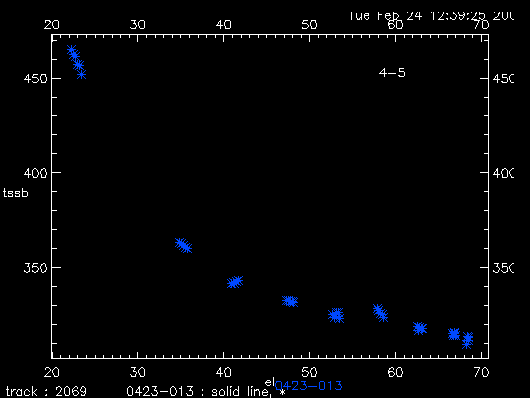
Once you believe it is a good fitting, then you can type yes to fix the tsys values, and the resulting tsys vs el plot is shown in Figure 3.
Sometimes in a track there will be only very limited tsys points for some certain sources. Actually they are no use at all in the calibration and you just neglect them during calibration. You can select only the useful sources for tsys correction. If you want to get the correct amplitude calibration, I guess you need to make a big effort to do tsys correction by setting filters even baseline by baseline.
The SMA does not automatically scale the data by Tsys as would be done at most other radio telescopes. The amplitude out from correlator is not corrected by the attenuation of the Earth atmosphere. Thus, the visibility amplitude needs to be multiplied by system temperatures. After you make sure the tsys values look fine, you can weight the data by Tsys:
     IDL> select,/pos_wt,/reset
     IDL> apply_tsys
Starting from September 1st, 2004, we have a much improved routine apply_tsys. It first creates a SSB Tsys from the DSB Tsys (which is confusingly stored as Tssb in the raw MIR data). It then scales the raw amplitudes by the SSB Tsys * 130.0 to create a pseudo-Jy scale . It then uses the integration time, bandwidth (the correct bandwidth for continuum band has been fixed in uti_avgband, another reason to use uti_avgband at beginning of your calibration), assumed aperture efficiency of 0.75 and correlator efficiency of 0.88 to calculate the rms noise (and from that the weights) on the SAME pseudo-Jy scale. Please check the details in testing log 7887 by Mark Gurwell.
If the Tsys measurements are reliable, apply_tsys will usually result in an improvement in the signal-to-noise ratio of longer tracks that were taken over a range of elevation angles. Some improvement may be obtained in cases of marginal weather. Also with the new improved version of apply_tsys, we don’t need to worry the low weighting problem for AIPS users as described in log 7828. The command apply_tsys simply runs the underlying MIR procedure, uti_tsysamp.
Remember the command apply_tsys will be only run once, preferably at the beginning after you fix the tsys and regenerate the continuum band.
The instructions below show how to calibrate a sma track using MIR . The calibration steps that you will have to go through in order to produce a calibrated (u,v) dataset are:
When you get to the end of the process your data should be fully calibrated. At that point it will be a good idea to look at the continuum and spectrum plots of calibrators and sources and flag bad data before writing out the calibrated fits files (see Section 7.1). Using mir_save and mir_restore at certain point of the process will save you time when you have doubt about the outcoming of one certain step.
To do passband calibration with smoothing over 20 channels:
     IDL> select,/pos_wt,/reset
     IDL> pass_cal,smoothing=20.
and the calibrator selection loop will start. When the calibrators are chosen, the window will be drawn, and finally the option of applying the passband calibration. The absolute fluxes of the passband calibrators are not relevant to the calibration because the total amplitude across each spectrum of the calibrator is normalzed to unity before applying the passband corrections. Fluxes do not have to be entered in the passband selection loop.
To apply one sideband passband fitting solution (upper sideband in example below) to the other sideband:
IDL> pass_cal,sideband='u',smoothing=20.
this option will allow users to use line-free sideband passband solution to flatten out the other sideband.
passband calibration can be done with polynomial 2nd order:
IDL> pass_cal,poly=2
If you don’t want any phase unwrap, use:
IDL> pass_cal,smoothing=20, /no_unwrap
To do antenna-based passband calibration with reference antenna 4:
IDL> pass_cal,tel_bsl='telescope',refant=4
The derivation of antenna-based solution on channel-by-channel bases is included in the pass_cal programs. Use keyword "tel_bsl" to specify the solution mode and use "refant" to specify a reference antenna. With enough S/N on each channel, the antenna-based bandpass solution appears to be robust and consistent with baseline-based calibration result.
IDL> pass_cal,tel_bsl='telescope',refant=4, preavg=10
"preavg" keyword is added for "pass_cal" to allow channel-averaging prior to deriving the passband solution. The feature should help a bit passband correction of data taken with the extended array config where S/N is low in each channel on long baselines. It also helps ant-based delay derivation. By default, preavg=1, which means no averaging. it works also for baseline-based solution.
The delay fitting routine works very like normal passband calibration, and it starts with
IDL> pass_cal,/delay
To derive the delay, it will work only on sky frequency vs phase. So it would ignore any x_var and cal_type you set.
After you select the source you use for deriving delay, (I used saturn here), the program will plot out the phase vs fsky in the whole bandwidth. If you have 24 bands, then it will cover all 2GHz. A yellow straight line on phase 0 is also plotted. If the source has enough signal/noise, you could tell the clustered phase points and also the wraps they form. Quit from the plot by right click or type ’q’ which you click the middle button for menu display, next you should find two points to determine the delay fitting. Both the two points should locate around center of those clustered points. The program will specificly ask you to choose the first and second phase-frequency point by clicking on the plot and also enter the wrap number between the two points. Note that this number will have positive or negative value, negative value means the phase is decreasing with frequency when wrapping.
In order to keep the phase closure, antenna-based delay fitting can be used when delay is set to 2, the program will ask for inputs of the delay slope coefficients of each antenna, and then the phase and delay will be overplotted either in baseline-based or antenna-based. Although we cannot fix the ant-based delay interactively, at least it should keep the phase closure. The delay coefficient for each antenna can be derived by hand using the delay slopes of baselines determined on those with high s/n phase, and the result can be checked by overplotting the phase and delay info. See details in testing log 7102, 7230.
Atmospheric (baseline-dependent) phase noise dominates the phase gain rather than thermal noise. Amplitude de-correlation is also strongly baseline-based for long baselines. Therefore, baseline-based gain is generally suggested for amplitude gain. If limited by S/N, then telescope-based gain may work better for phase gain. In both types of gains, you need to input the fluxes of calibrators to normalize the amplitude gains.
To do baseline-based amplitude calibration with box smoothing over 0.8 hours:
IDL> gain_cal,x='hours',cal_type='amp', smoothing=0.8
In gain_cal, the first job is to specify the gain calibrators and set their fluxes. This must be done by hand because the SMA has no calibrator data base. gain_cal enters a loop in which it is possible to specify whether each source is a calibrator and if so, the flux. The values are saved to the data set, so it should be necessary to do this only once. It is not necessary to enter the flux if the source already has a flux or if the source is not a gain calibrators. Each gain calibrator used must have a non-zero flux. If you don’t know, use unity.
Use of multiple gain calibrators is not a usual observing strategy, but if this situation arises and you do not know the fluxes for the quasars, then set the fluxes so that the average observed amplitudes divided by the fluxes you set are the same number. Absolute flux calibration can be done later (see Section 5.3.1).
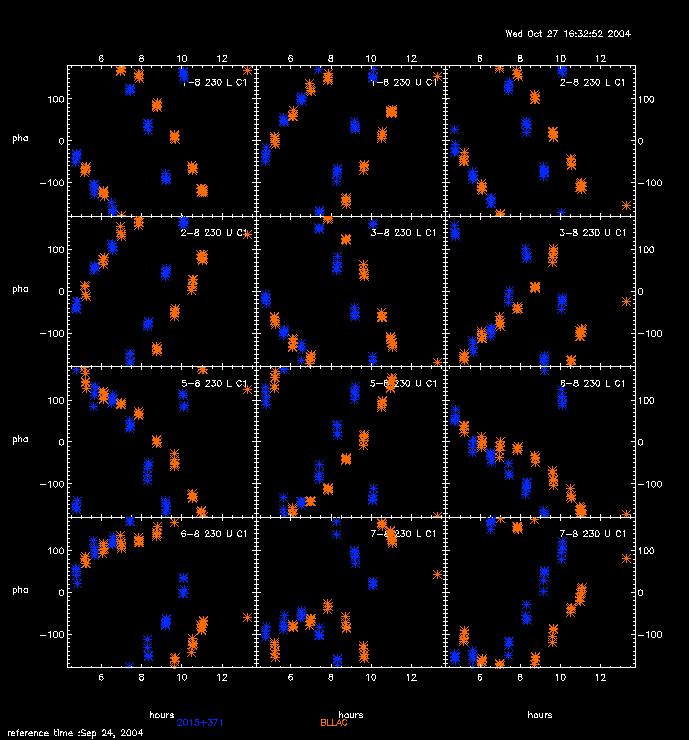
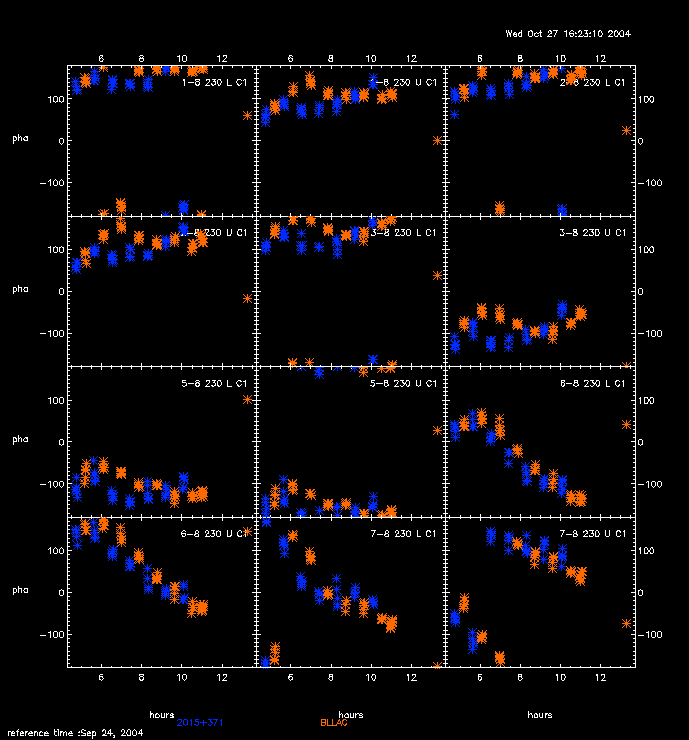
Once the gain calibrators are specified, the program generates some plots. Each frame has a different combination of baseline, sideband, and continuum band (receiver). The plots are individually labelled in the upper right corner for example,
2-3 230 L C1
referring to baseline 2-3, receiver 230, lower sideband, and continuum channel C1.
The data shows up as asterisks for phase and a histogram style line for amplitude. The data is usually blue, but the color can depend on the display. The fits show up as solid lines overplotted on both amplitude and phase. The fits are usually orange.
There is a flagging option to pick out individual data points. This flagging program is the same as in plot_continuum and behaves the same way. If you do some flagging at this point, it is necessary to re-run select or dat_filter (for positive weights) and gain_cal in order to re-fit the gains to the data ignoring the recently flagged points. To do this answer "no" when asked whether to apply the gain solution. (This question comes up once all the plotting is finished.) The gain_cal procedure then exits saying, "NO: nothing done". This message means the gains are not applied to the data, but any flagging that was done, is carried forward. When you re-run gain_cal, your recently flagged points will disappear, and the fits will ignore the flagged data.
After displaying the plots, gain_cal will ask you whether you want to apply the solutions. (The underlying MIR function is cal_apply.) Following the application of the gains, the solutions can be checked with plot_continuum.
To do an antenna-based phase calibration with box smoothing over 0.8 hours and reference antenna on 5
     gain_cal,x='hours',cal_type='pha', smoothing=0.8,
                   tel_bsl='telescope',refant=5
Sometimes after heavily data editting, antenna-based calibration might not be working if some baselines data are missing. You might change loose number. The antenna-based calibration program by default requires that at each solution interval, the number of antennas matches the number of baselines When there are many antenna/baselines, sometimes it’s OK if a few baselines data are missing. set loose will ignore this ristriction. Be aware that when the number of antennas/baselines are small, a few missing baselines will break the phase-closure relationship, hence the solution may not be reliable. "loose" has no effect in the tel_bsl=’baseline’ case.
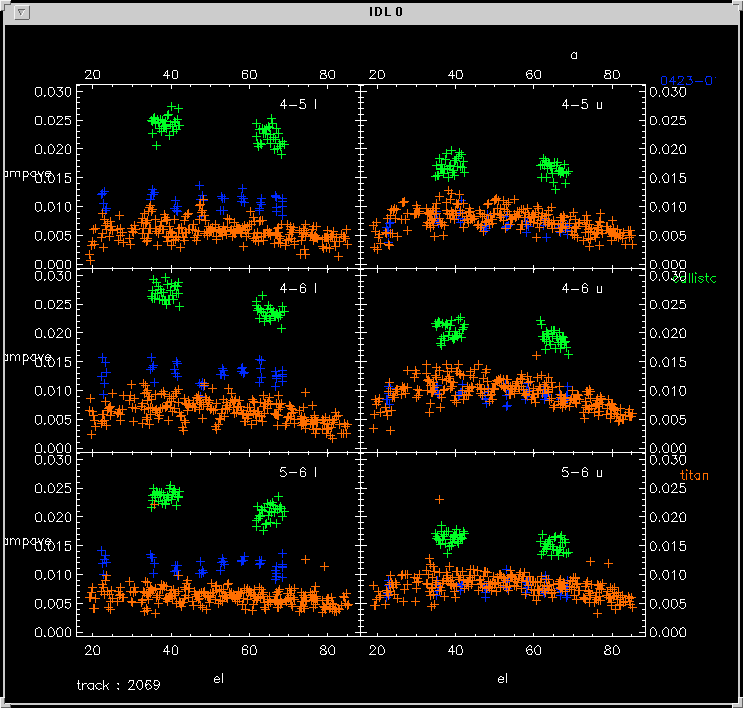
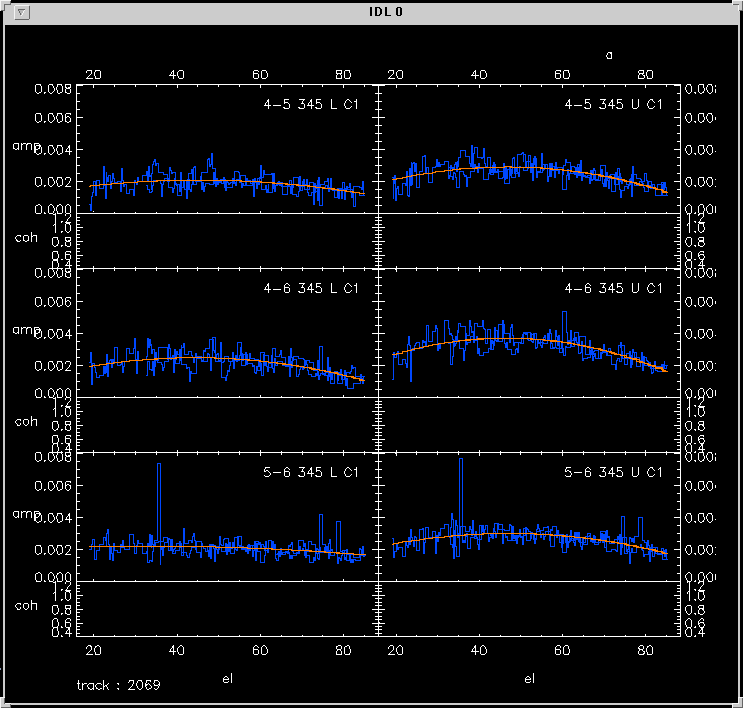
We found that the amplitude of our data is a function of elevation due to the change in airmass and pointing problems. For example, Figure 4 below shows the changes of amplitude vs elevation from a titan track, even after tsys correction. Most of the changes probably came from the pointing uncertainty at the low and high elevation.
By fitting a 2nd polynomial curve over the amplitude of gain calibrator, we can derive an el-dependent amplitude gain , shown in Figure 5 (fit the gain curve on titan, assuming an amplitude of 3 jy):
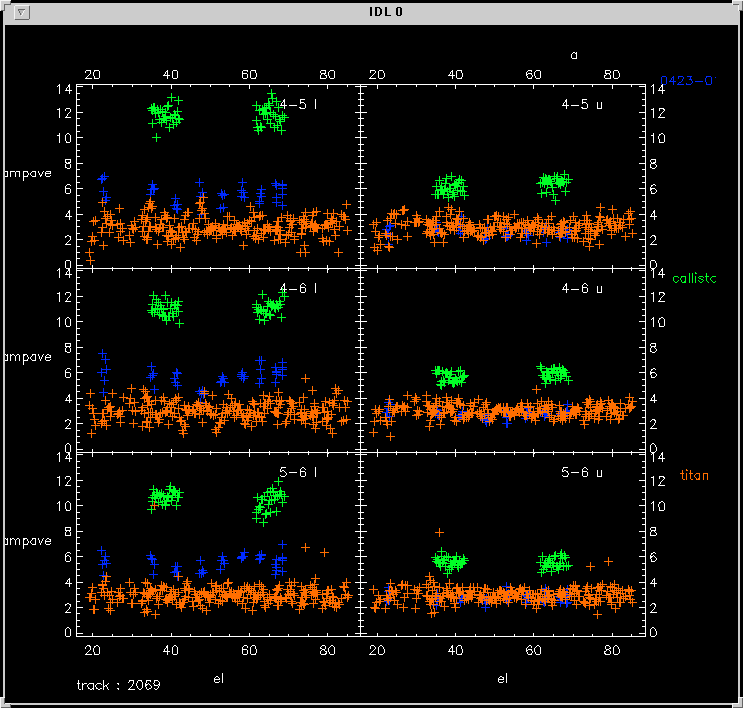
Applying the gain above, the amplitude vs elevation for each source are shown in Figure 6:
The EL-dependent amplitude gain calibration above is done with the mir command:
IDL> gain_cal, x='el', cal_type='amp', pol=2
No smoothing window is needed since we fit 2nd polynomial over the whole elevation range.
A new set of gain calibration routines are now available in MIR. The new routines allow the usage of a single spectral line for phase reference in phase gain calibration. The package also includes a preliminary implementation of phase calibration in the dual-band mode.
For using a single spectral line for phase reference, follow the example below:
     IDL> gain_cal,x_var='int',tel_bsl='baseline',/line,calsb='l',
                     calband='s14',calbchan=58,calechan=65
The above gain_cal command specify the reference data in the "line" mode, with the spectral line located in the LSB chunk "s14" between channel 58 and 65. Visibilities between those channels will be vector-averaged and used for solving the (phase) gain solution. Please notice that the solution will be presumably only applicable to data in the same sideband. There would be (likely constant but unknown) phase offsets in the solution for the opposite sideband.
For the dual-band mode calibration, that is, using the low frequency band data for deriving (phase) gain solution to be used, after applying some certain scaling, for the high frequency band, please see the command example below,
     IDL> gain_cal,x_var='int',tel_bsl='baseline',/line,calsb='l',
                     calband='s14',calbchan=58,calechan=65
or the following if perferring antenna-based solution,
     IDL> gain_cal,x_var='int',tel_bsl='telescope',/dual,/line,calsb='l',
                      calband='s14',calbchan=58,calechan=65,refant=1
Following the first example, the gain_cal command specifies the same spectral line for deriving the primary gain solution (in the low frequency band). In addition the "/daul" flag activates the dual-band calibration mode. In this mode, before going into the primary gain solution, one will first be asked to specify a (strong) reference calibrator to be used in deriving the phase scaling factors between the two frequency bands. Next, via a few interactive prompts, one will be asked to select the reference data (continuum or line, sideband, chuck, and/or beginning/ending channels) for deriving the low and high frequency phase solution for this reference calibrator, respectively.
When the phase gain solutions are derived for both frequency bands, the routine will show a series of (baseline-based or antenna-based) phase relation plots for the reference source. These are basically, in our current case, plots of 690 GHz phases v.s. 230 GHz phases. A free-slope scaling and offsets as well as a fixed slop (using frequency ratio) scaling and offsets are both derived from linear fits and plotted.
After the phase scaling factors are derived, the routine will go into the usual gain derivation mode. At the end, one can apply the primary solution to the low frequency band (or not, if rawdata data needed for deriving another phase scaling for the data at the opposite sideband in the high frequency band), and the high frequency band data.
Here are some notes for dual band calibration:
The standard statistical uncertainties for the output parameters are output to the terminal
IDL> gain_cal, /non_point, cal_type='amp'This flag "/non_point" in gain_cal allows one to use planet/satellite as calibrators. It assumes the calibrator is a uniformly disk. The size and flux of the calibrator will be automatically retrieved and calculated by the gain.pro and flux_primary.pro routines. See details in test log 7187 and 8081.
IDL> gain_cal,/preavgThis flag "/preavg" in the gain_cal routine allows cal data points to be "pre-grouped and vector-averaged" before gain solution is derived. The function would average data points within consecutive integrations on the calibrator, but here this is done in the gain.pro dynamically and the rawdata will not be affected. The function can be used when one wants to pre-average the data in order to gain better S/N before gain derivation and fitting is done. Regular boxcar/polynomial smoothing or point-to-point connection (/connect, see below) CAN be applied on the "pre-averaged" gain curve.
CAUTION: the averaging is done in the "integration" domain. it will NOT be valid if data acquisition was stopped and restarted with consecutive integration numbers, since in between the consecutive integration during the observation, a long time may have passed. The visibility averaging thus will not make sense.
IDL> gain_cal,/connectThis flag "/connect" in the gain_cal routine allows cal solutions to be derived simply by connecting gains in the point-to-point manner. It is equivalent to NO smoothing, which is not available in the original gain_cal program. This function can be used when only single scans are acquired for the cal source in each cycle or when the above "/preavg" function is used and no further smoothing is desired.
Flux calibration can be done on the basis of both primary and secondary flux standards. The primary flux standards have apriori known fluxes and at present we suggest use only Uranus and Neptune (Other plants can also be used but some of them are heavily resolved). See Section D for the detailed flux models for planets. The secondary flux standards are only sources whose fluxes are first determined from comparison with the primary standards, but then once they are known, these secondary standards can be used to determine the fluxes of other sources. Most of the secondary sources are quasars with small source size so that resolution effects can be ignored. You can always input the flux of the secondary stardard.
So as mentioned above, we have two ways of flux calibration and choose whatever is possible. The command in IDL is:
     IDL> select,/pos_wt,/reset
     IDL> sma_flux_cal
Before any flux calibration, the program will print out the sources and amplitudes (correlator output counts) and corresponding predicted fluxes (see below).
You should specify which planet you use to derive the scale factors ( Jy/counts) for each baselines, by which the flux of the planet will be calculated considering the length of the baseline.
For non-planet sources in the dataset, the program will print out the fluxes of all the sources in the database with the similar frequency band within 30 days. If no sybase can be reached, the fluxes will be 0. One can choose a strong quasar with the flux well determined (we hope) as the secondary flux calibrator and enter the source name and the input flux seperated by a space. The flux of Neptune itself is affected by the CO absorption lines. So one can enter neptune’s flux from Mark’s planetary visibility web page which considers such effect, instead of the above calculation based on the temperature table.
After we input the calibrator name and the flux, a table will be made to print the average scale factor, the average scale factors for LSB and USB, and the average scale factors for each baseline. There are a couple of ways to use the Jy/counts values. Various options one can choose are:
Then after we choose the way of using the Jy/counts, we should apply the scale factor(s) to the whole data for flux calibration.
After calibrating data, one can measure the average flux for each source in either sideband or average in both. The command in IDL is
IDL> flux_measure
One can choose whether we do Scalar average or Vector average. The result can be entered into database if sybase is available, eg. at caltech and at summit. Before choosing Vector average, one should do phase calibration first to flatten the phase. If Vector average is chosen, the program will check whether any phase calibration have been already done. One can enter the quality of the measurement (judging by the SNR output) and comments about the measurement when entering the result into database.
The calibration procedures in this chapter apply to the new polarization data which contains four polarization states for each integration/baseline/sideband/band combinations. Three parameters in the BL structure are used to store the headers of the polarization data: ipol, iaq and ibq. The bl.ipol codes for polarization states are 0 (unknown); 1 (RR); 2 (RL); 3 (LR); 4 (LL). bl.iaq is set to 0 if the lower numbered antenna used the 345 Rx, and 1 if it used the 400. bl.ibq is coded in the same way for the higher numbered antenna on the baseline.
To select the data with polarization state “RL” in baselines Rx345–Rx400, the MIR commands are
     IDL> select,state='RL',/p,/re
     IDL> result=dat_filter(s_f,' "iaq" eq "0" and "ibq" eq "1"')
To use plot_continuum to plot continuum with polarization states in different colors:
     IDL> select,/p,/re,sideband='u'
     IDL> plot_continuum,color='pol',/preavg
The following four steps are needed to calibrate the new polarization track.
To do passband calibration with reference antenna 4 (antenna-based calibration by default):
IDL> pass_cal_pol, refant=4, smoothing=2, preavg=2, ntrim=1
The syntax is similar to pass_cal.
The main features of the program are:
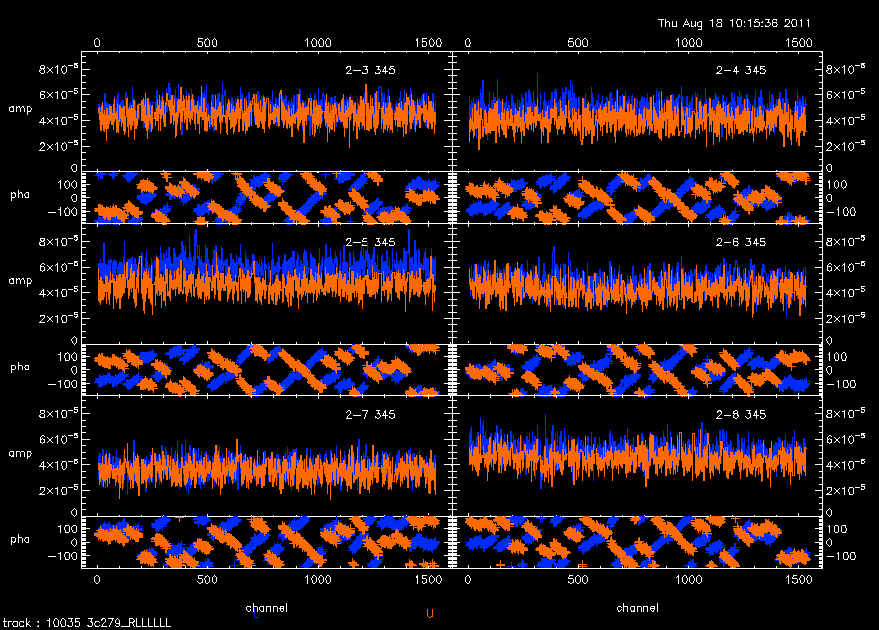
After applying the passband solutions, the cross-rx data still has delay and offsets among chunks (Figure 7, see below for the plotting commands).
uti_xdelay can be used to derive and apply the delay corrections and reset the chunk offsets to the cross-rx data. A reference source will be needed to determine the delay and chunk offsets. Here is the syntax to use the program:
IDL> uti_xdelay,reference='xxx',preavg=4, ntrim=1
This program will average all the data of the reference sources and fit a 1st order polynomial and apply the solution on the cross-rx data. To check the quality of the passband solution on the cross-rx data:
     IDL> select,/p,/re
     IDL> uti_avgband
     IDL> select,source='xxx',state=['RR','LL'],/p,/re
     IDL> result=dat_filter(s_f,'"iaq" eq "1" and "ibq" eq "0"')
     IDL> plot_spectra,ntrim=4
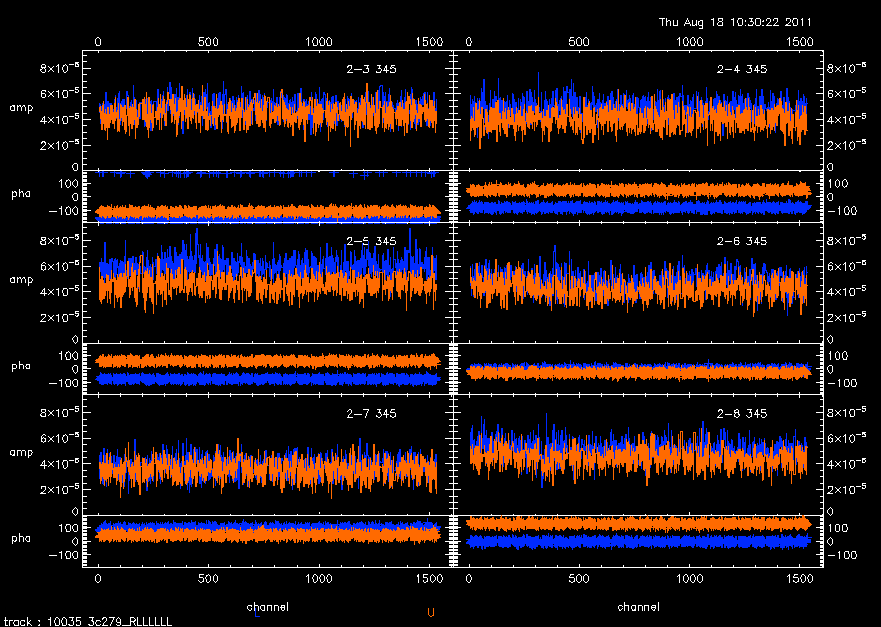
The first line selects the strong signals from polarization states "RR" and "LL". The second line stacks the filter with first antenna with 400 GHz receiver (iaq=1) and second antenna with 345 GHz receiver (ibq=0). Figure 8 shows the cross-rx passband after using the program.
To do gain calibration with reference antenna 4 (antenna-based calibration by default):
IDL> gain_cal_pol, refant=4, x='hours',smoothing=0.3
The syntax is similar to gain_cal.
The main features of the program are:
     IDL> result=dat_filter(s_f,'"iaq" eq "0" and "ibq" eq "0"',/reset)
     IDL> select,state=['RR','LL'],band='c1',/p
Then go through your normal flux calibration procedure.
After applying the gain solutions above, the cross-rx data still shows variation with time. uti_xgain can be used to derive the cross-rx gains:
IDL> uti_xgain,x='hours',/preavg,smoothing=0.3
The syntax is similar to gain_cal. The program vector-averages all the related cross rx continuum with strong signals (stored in a temporary structure) and derive the gain solution and apply the solutions to all the cross rx data. It works on the full dataset and ignores the data filtering.
Here is an example of a full polarization calibration procedure:
     IDL> select,/p,/re
     IDL> uti_avgband
     IDL> pass_cal_pol, refant=4, smoothing=2, preavg=2, ntrim=1
     IDL> uti_xdelay,reference='xxx',preavg=4,ntrim=1
     IDL> select,/p,/re
     IDL> uti_avgband
     IDL> gain_cal_pol,refant=4,x='hours',smoothing=0.3
     IDL> uti_xgain,x='hours',/preavg, smoothing=0.3
You can use uti_subcont to subtract continuum from the spectral bands.
     IDL> select,/p,/re,source='l1551'
     IDL> uti_subcont
It can be used before you output to FITS or miriad file for imaging.
You must flip the phase of lower sideband data before outputing to imaging.
     IDL> select,sideband='l',/reset
     IDL> phase_conjugate
There is no need to flip the lsb phase of the SMA data after April 28, 2005 Otherwise, use phase_conjugate,/force to force the flip. If you want to use sideband option in passband calibration, i.e. use one sideband to calibrate the other sideband, you might need to force the phase flip on the lower sideband. Please contact Mark Gurwell or Charlie Qi about the details.
Sometimes a science track is splitted into two or more dataset. SMA tracks can be merged together. You have to use mir_save to create the dataset files for the separate data. Then use the wrapper program
IDL> sma_dat_merge
by giving the dataset filenames following the questions of the wrapper.
Please note that sometimes the dataset has inconsistent data structure with header information and sma_dat_merge will stop and request for reading data again with readdata. The easy way to check whether the dataset has inconsistent header info is:
     IDL> print,max(pc)+sp(max(ps)).nch
     IDL> help, ch
Just compare the size of CH with the first print out number. If they are not the same, you should use readdata to avoid the last integration of the dataset. For example there are 291 integrations in this dataset, then you can use readdata as:
IDL> readdata, int=[0,289]
Sometimes we observe a science project before a decent baseline or a better baseline solution is obtained. For example, the data taken on September 24th ( log entry 7996) has some baseline problem in ant 8 as shown in Figure 9.
Later the ant 8 baselines solution has been improved. In MIR we can use sma_cal_bas.pro to correct the phase from the updated antenna positions. Luckily with recent datasets, we have been storing the baseline info within the file "antennas" in the data directory. Now we can use the improved baseline info in the latter dataset to correct older ones. For example I used the antennas info from 040926_04:19:28 (which has the updated baseline info) to correct the phase of the data above.
For data before April 28th 2005, the lowersideband phase needs to be flipped for sma data. This can be done anytime but only once. In order to correct for the lower sideband phase, we need to flip the phase for lowersideband before baseline correction though. After that, there is no need to flip the phase for lower sideband. Please remember no need for lower sideband phase flip after April 28 2005.
Here is the process:
     IDL> select,sideband='l',/reset
     IDL> phase_conjugate
     IDL> select,/p,/r
     IDL> sma_cal_bas
     Enter the current ANTENNAS file: /sma/040924_04:41:56/antennas
          1.0000000       4.4399830      -63.875500      -21.837710
          2.0000000       11.738580      -53.666100      -40.725850
          3.0000000      -5.7009240      -18.986850       15.610220
          4.0000000       5.2274950      -20.076900      -14.844340
          5.0000000      -42.602290      -71.551010       86.196400
          6.0000000       0.0000000       0.0000000       0.0000000
          7.0000000      -21.509590      -51.019160       39.957640
          8.0000000      -6.4015090      -68.001710       3.6366920
     Enter the new ANTENNAS file: /sma/040926_04:19:28/antennas
          1.0000000       4.4399830      -63.875500      -21.837710
          2.0000000       11.738580      -53.666100      -40.725850
          3.0000000      -5.7009240      -18.986850       15.610220
          4.0000000       5.2274950      -20.076900      -14.844340
          5.0000000      -42.602290      -71.551010       86.196400
          6.0000000       0.0000000       0.0000000       0.0000000
          7.0000000      -21.509590      -51.019160       39.957640
          8.0000000      -6.4004240      -68.000270       3.6351620
     Starting the baseline correction now:
     Baseline correction done !
You need to provide the old and new antennas file names as indicated above. The phase on Ant 8 is corrected reasonably well, as seen in Figure 10.
Please note that the default antenna number for sma_cal_bas is 8 (keyword ntel = 8). If you have different antenna number (e.g. for eSMA usage), you can change the keyword ntel to 10:
IDL> sma_cal_bas, ntel=10
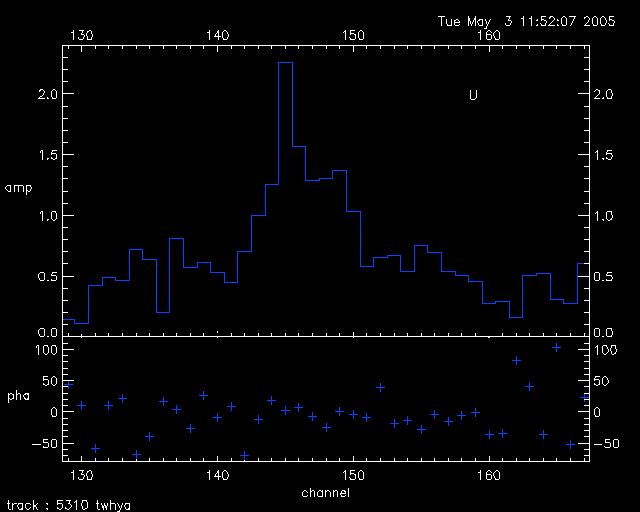
We have a program uti_erot_fix.pro to correct the velocity shift due to the earth rotation which was disabled in the data between Dec.10, 2004 and April 29, 2005 as reported in log entry 9294. Note that earth orbit velocity change hasn’t been accounted in current version of the program since it is a very small effect. I applied the correction on a recent TW Hya CO 2-1 data in extended configuration (taken on April 10, 2005). Figure 11 shows the spectra before correction:
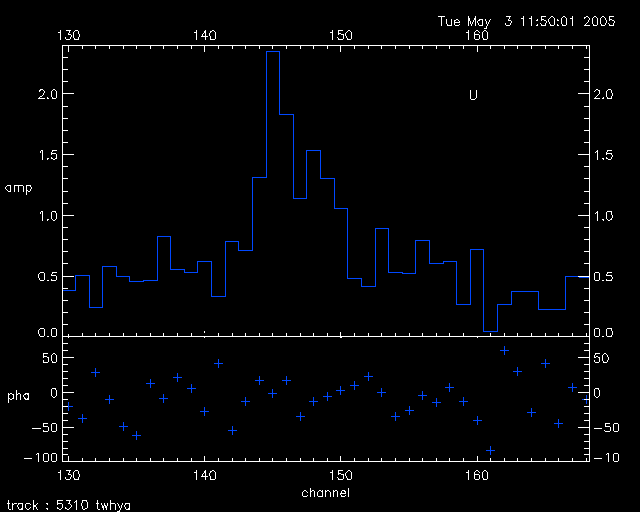
and Figure 12 shows the spectra after correction.
The resolved double peaks of CO 2-1 line of TW Hya is clearer in the corrected spectra and the edges of the line are clear cut compared to the smeared spectra without any correction.
To use the program, you need to select the SOURCE data which the dopplerTrack command was issued on, otherwise the correction would be wrong. You can select multiple bands or all the bands for velocity shifting, but be aware it would take more time. For my twhya case which I have CO 2-1 line at upper s15, the command I am using is:
     IDL> select,source='twhya',sideband='u',band='s15',/p,/re
     IDL> uti_erot_fix
If there is any compilation error, please compile the program first:
IDL> .comp uti_erot_fix
The program will first check the observing date, if it is earlier than Dec 10, 2004 when Taco believes the beginning time of the bug or it is later than April 29, 2005 when Taco fixed the bug, the program will stop and print out "No action is done" message, i.e. no velocity shift will be done on the data taken outside of the period between Dec 10, 2004 and April 29, 2005 if you run uti_erot_fix. But people can still force the velocity shift by
IDL> uti_erot_fix, /force
The other useful keyword is sign, which is a flag for different sign of the velocity shift :
IDL> uti_erot_fix,/sign
But the default sign for uti_erot_fix should work for our current SMA problem. Again, you don’t need the sign flag to fix the current data problem between Dec 10, 2004 and April 29, 2005. The lower sideband phase must be flipped during this period before you use the program (forget the data in April 29, 2005).
Since dopplerTrack is applied to the main source, if there are multiple sources in the track (I mean the sources with narrow lines you are interested in), we still need the main source info for velocity shift correction. To apply the correction for multiple sources track, for example, if you have HH212_1, HH212_2 etc and you did dopplerTrack on HH212_1, you need to use ’source’ keyword to specify which source you used for dopplerTracking:
     IDL> select,source=['HH212_1','HH212_2',...],sideband='u',
 band=[...],/p,/re
     IDL> uti_erot_fix, source='HH212_1'
My suggestions for the people who had already done the calibration (including the phase flipping on lower sideband): you don’t have to redo the calibration. You just do the velocity shifting right before you output the visibility for imaging. That should be good enough.
uti_vel_fix can be used to correct the veolicty header problem for some certain bands by using the header info from a nearby band. (see log 8081)
uti_uvw_fix can be used to correct the uvw header problem for some certain baselines using the antenna header info. ( see log 7820)
uti_pos_fix can shift the position of the calibrator(s) and change the header and phase of the calibrator(s) according to the position offset input (see log 8385).
To plot a phase closure, use
IDL> uti_phaseclosure
and provide any 3 antenna numbers to plot phase closure.
For all data taken before November 26th 2007, the frequency header has to be shifted by half-channel. uti_fqhdr_fix can be used to fix the problem (see details of the problem in log 14506). The fix can be used at any step during calibration. Be careful not to use it more than once. For data taken after November 26th 2007, the program won’t do anything. To use the program:
IDL> uti_fqhdr_fix
If there are multiple targets in the track, only one target will be ’dopplerTracked’, i.e. doppler corrected according to its radial velocity respect to the observatory. So only the lines on this target will have the correct velocity information. The lines in the other targets will be shifted and smeared by earth motion, depending how far away they are from the main ’dopplerTracked’ target. uti_doppler_fix can be used to fix the problem, i.e. calculate the radial velocity differences between the main target and the others, and apply them to the data scan by scan. To use the program:
     IDL>select,/pos_wt,/reset
     IDL>uti_doppler_fix,reference='maintarget',
                     source=['source1','source2'...]
where maintarget is the ’dopplerTracked’ source. The calculated velocity differences will be applied to the source list. If the keyword source is not used, the velocity shift will be applied to all the sources except the ’dopplerTracked’ one.
If the dopplerTracked source data was not stored in the dataset, you need to provide the apparent RA and Dec (in radians) of the dopplerTracked source to the program with RAREF and DECREF keywords, e.g.
IDL> uti_doppler_fix,raref=3.27054, decref=0.03498
which uses the apparent RA and Dec of 3C273 (dopplerTracked source) to make the velocity shift on all other sources.
To find out the apparent RA and DEC for the dopplerTracked source, go to the SMA Observer Center page - Reference - Engineering data plotter:
Search string for DSM_AS_IFLO_RA_D and DSM_AS_IFLO_DEC_D
set the start time as the track starting time, stop time can be anytime after the start time but before the stop time of the track, and set format as ASCII text listing, then click go, it should print out the apparent RA and DEC in radians, which can used as the values for raref and decref.
For higher spectral resolution, there are ’HiRes’ configurations available that will provide 2048 channels or 4096 channels for 1 chunk. Currently only bands s01, s05, s09, s16 and s20 can have 2048 channels. In current configuration, the chunks with ’HiRes’ mode will have to be averaged to generate the final ’HiRes’ band. You can use the program “hires”:
IDL> hires,band='s01'
will use band S01 and its nearby band S05 to regenerate the ’HiRes’ band and save the data in S01.
With 2 GHz bandwidth in both sidebands, it is not surprising you might find lines you are not expecting. There is an easy way to identify those lines (or rather find out their rest frequencies within the uncertainty of the spectral resolution) in MIR.
When you use plot_spectra with x-axis as ’fsky’, the x-axis is sky frequency in GHz, which is not useful to identify the three lines in the plot because of the frequency shift due to the Earth’s orbital motion etc. To shift the frequency header to the rest frequencies, here is an easy way:
       shmValue -m hal9000:m5 dsm_as_iflo_vradial_d
                -s "2006-04-28 06:00:00"
      IDL> select,source='twhya',sideband='u',band='s16',/p,/re
      IDL> velocity=25514.8
      IDL> uti_restfreq,vel=velocity
      IDL> plot_spectra,frame_v='sb',x='fsky'
Please note that after using uti_restfreq, the FSKY header has been changed and the sky frequency values are replaced with the rest frequency values. It is just for the convenience of plotting spectra in MIR to identify lines. since the FSKY header has been changed, You can either reverse the action:
  IDL> velocity=-25514.8
  IDL> uti_restfreq,vel=velocity
or just use mir_restore to restore the original data to continue the rest of procedures for data calibration or output.
MIR routine uti_hayshft_fix can be used to fix the diurnal doppler tracking error in tracks taken between 2011 April 4th and 2019 April 3rd. Generally the program should be used after the full calibration, before the MIRIAD or UVFITS output. For tracks with single target source:
     IDL> select,/p,/re
     IDL> uti_hayshft_fix
For tracks with multiple targets or filler tracks, run uti_hayshft_fix first and then run uti_doppler_fix for velocity shifts on non-dopplerTracked sources:
     IDL> select,/p,/re
     IDL> uti_hayshft_fix
     IDL> select,/p,/re
     IDL> uti_doppler_fix
Note that uti_doppler_fix program has been updated on 2019 April 22nd to fix a bug related to velocity shifts with multiple sources.
Visibility data can be written to UVFITS files. There are three ways of writing:
     IDL> write_fits,filename='myfile',source='pluto',
                         'sideband='u',band='s2'
IDL> mir_fitsand follow the questions.
     IDL> select,/p,/re
     IDL> autofits, source='xxx'
It will automatically generate UVFITS files for the source 'xxx', looping over receivers, sidebands and bands.
All three procedures use MIR function fits_out.
FITS files must contain the same number of channels in each band and the same number of bands in each sideband. Thus the continuum, which has one channel, cannot be written into a FITS file with any spectral bands. If different spectral bands have different numbers of channels, they cannot be written together in the same FITS file.
The MIR fits_out program will not yet write data from both receivers into the FITS file, although this would be allowed in FITS.
Data with different correlator setups with different velocity definitions may also be unallowed in FITS. There is some flexibility provided by the FITS frequency (FQ) and source (SU) tables, but not much of it will be exploited by the MIR fits_out.
UVFITS files can be loaded into CASA with python code MIRFITStoCASA.py which can be downloaded from here.
To load the uvfits file (e.g. SOURCE_U_S1_RX240.UVFITS) into CASA, e.g.:
   CASA <1> import sys
   CASA <2> sys.path.append('***path-to-folder-containing-MIRFITStoCASA***')
   CASA <3> import MIRFITStoCASA
   CASA <4> MIRFITStoCASA.MIRFITStoCASA(UVFITSname='SOURCE_U_S1_RX240.UVFITS ', vis='source.rx240.us1.ms')
which will use CASA task importuvfits to load uvfits file into CASA and also apply the correct weights scaling factors to the data. Remember the edge 1200 channels for each band should be excluded.
It would be wise to carefully check the frequency and velocity definitions in the data once inside CASA or AIPS to make sure that they agree with the data in MIR .
Visibilities in different bands (chunks) will show up in different IF’s in AIPS. Visibilities in different sidebands will have different FRQID numbers in AIPS. The UVFITS file is written with the signs of the phases set according to the VLA convention.
idl2miriad is an IDL routine to directly convert SMA MIR-IDL data into the MIRIAD format. As many SMA specific calibration procedures can only be done in IDL, there is no intention, however, to encourage data calibration in MIRIAD alone. The MIRIAD format file output by idl2miriad should be used mainly for imaging purpose (e.g. INVERT, CLEAN and RESTOR). Self-calibration ( e.g. SELFCAL) and some limited general purpose tasks (e.g. graphic and data information display) should also work. UVW coordinates and frequency (or velocity) header conversions should be done within MIR before the output. Note that if the MIR users prefer to use SMA MIRIAD beta distribution for imaging, please set the keyword ’smamiriad’ to 1 (e.g. ’smamiriad=1’) when using ’idl2imiriad’ in MIR, and use ’options=nochk’ to disable the header check when using ’INVERT’ in the SMA MIRIAD beta version.
Below are the procedures to use idl2miriad to convert MIR-IDL data into the MIRIAD format on CF linux machine (cfa0.cfa.harvard.edu) or RG linux machine (rtdc9.cfa.harvard.edu):
source /sma/mir/setup (on CF linux or solaris machines)
source /opt/mir/setup (on RGLINUX4)
assuming afgl.mir is a mir_saved dataset for source afgl5142, the routine will create a miriad dataset(directory) named "afgl":
     IDL> mir_restore,filename='afgl.mir'
     IDL> select,/reset,/pos_wt
     IDL> idl2miriad,dir='afgl5142_miriad',source='afgl5142'
                  (,sideband='u',band='s14',/verbose)
     IDL> flag,/frst
     IDL> flag,/last
when appropriate.IDL> plot_spectra,x='velocity'
We have started the new data format since the new SMA semester on Nov. 15th, 2014. MIR should be ready for processing the ASIC correlator data with the same calibration procedure as before. Here is the guideline for data reduction using the new format with MIR:
New keywords swmavg and windows are created. The syntax is
IDL> readdata, swmavg=nAve1, windows=[band,startChan, endChan, nAve2]
The keyword "swmavg" is the value you can vector-average the two swarm correlator chunk and save as s49 and s50. This keyword can be an array of 2 for both s49 and s50. windows is defined the same as Taco did in CASA. Note here nAve2 has to be set to 1 for no averaging.
IDL> readdata, windows=[49,2561,12800,32], swmavg=32
will vector-average both the swarm correlator by 32 channes and save in s49 and s50. s51 will be created to extract the first swarm correlator starting channel 2561 to 12800 and vector-average by 32 channels. Windows can be also set to multiple windows, e.g.
     IDL> readdata, windows=[ [49,2561,12800, 512],
         [50,2561,12800,256]], swmavg=[256, 512]
will create s51 from the first swarm correlator data starting channel 2561 to 12800 and vector-average by 512 channels, and s52 from the second swarm correlator data starting channel 2561 to 12800 and vector-average by 256 channels. Then the first swarm correlator will be vector averaged by 256 channels and saved in s49, and the second swarm correlator will be vector-averaged by 512 channels and saved in s50.
     IDL> res=dat_filter(s_f,'"flags" ne "0"',/reset)
     IDL> sp[psf].wt=-1
NOTE: Since 2015 Feb 26, the above flagging has been added in
READDATA. IDL> result=dat_filter(s_f,' "iaq" eq "0" and "ibq" eq "1"')
can be replaced with
IDL> result=dat_filter(s_f,' "ant1rx" eq "0" and "ant2rx" eq "1" ')
IDL> uti_avgband, swmch1=1000, swmch2=15000
which will average the swarm chunks between 1000 to 15000 along with the typical range of asic chunks to generate continuum. The bandwidth of the continuum will be calculated accordingly. The weights will be reset by apply_tsys once the bandwidth is correctly set.
The keyword swmch1 can be an array of 2, so you can set different values for s49 and s50, e.g.
IDL> uti_avgband, swmch1=[1000,2000], swmch2=[15000,14000]
will average s49 from 1000 to 15000, s50 from 2000 to 14000 and those asic chunks to generate continuum.
     IDL> select,band='s49',/reset
     IDL> uti_chanfix, channel=9958
which will smooth out the spike at channel 9958 of s49. Users can easily loose track of the filter setting, and operate blindly on certain subset of the data. It would be a good practice if users keep reseting filter "select,/pos_wt,/reset" and select necessary subset of data. This is because sometimes the procedures still have bugs which leaves the pointer settings in a weird unusual state. The "select,/pos_wt,/reset" often fix that situation.
When combining datasets from multiple epochs, users have to be careful about whether different datasets are processed through similar calibration steps. For example, if one dataset was processed under "apply_tsys" and another one was not, the relative weights for the two datasets will be orders of magnitude different, as the weights were scaled in one case but not in the other. So, if the tracks were combined blindly, some tracks will be significantly down-weighted as compared to some others.
As we mentioned before, the drawback of IDL for SMA data reduction is that we need to put all the data into the memory of your machine. Clearly this will cause the memory deficient problem. Currently we have soloaris and/or linux 64-bit idl either in CfA and Hilo machines. Ideally we should not have memory problems but we are still limited by the physical memory carried by machines (for example for rtdc1 at RG here we have 64-bit idl but with only around 5GB memory) Also some other OS only have 32-bit IDL, which limits the memory usage size in process to around 2 GB. Please check here for the idl platform support.
But we do have solutions to the memory problems for 16-bit IDL and the physical memory limitation, that is, we put only useful data into memory. Actually you will find that most of the useful data is not that large and pointing data takes a lot of space. Here is what I suggest:
Here is the example to read upper sideband data:
IDL> readdata, dir='...',sideband='u'
Using the above command, you can load much smaller portion of data into the memory.
     IDL> result=dat_filter(s_f,'"integ" lt "10"',/reset)
     IDL> flag,/flag
similarly you can flag out all the data you are not going to use and then
use
     IDL> select,/p,/re
     IDL> mir_save,'...',/new
to save a new dataset which you will process later. In this way you will
avoid the memory problem during the calibration process.
With the above two ways, you will find that with about 1-2 GB memory, your computer should be able to reduce most of the sma data if not all, without the memory problem.
    % source /opt/mir/setup
    % idl
    IDL> readdata, dir='<directory>'
See MIR Cookbook Section 2.2 for setup locations and various programs to load subsets of data.
    IDL> select, /pos_wt, /reset
    IDL> uti_avgband
This step will pre-inspect the data and flag out flat-line spectra and
regenerate continuum band. Certain channel ranges can be used to
generate continuum bands. See MIR Cookbook Section 3.2 for details.Regenerating the continuum band in the presence of bad delays or poor chunk-to-chunk phase offsets can be useful after a phase-only passband calibration. See MIR Cookbook Section 5.1.
    IDL> select, source='0423-013', /pos_wt, /reset
    IDL> plot_continuum, x='int'
    IDL> plot_spectra, frame_v='blcd,sb', color='band'
    IDL> plot_var, x='prbl', y='ampave', frame_v='sb', color='blcd'
    IDL> select, source='0423-013', int=[200,250], /reset
    IDL> flag, /flag
Use plot_continuum, plot_spectra and plot_var to
inspect the data, check any strange phase jump, flag those suspicious
data points with select or dat_filter. It is always good
to check the amplitude of quasars or planets vs projected baselines with
plot_var. See MIR cookbook Section 3.3, 3.4 and 3.5. IDL> select, /pos_wt, /reset
IDL> apply_tsys
Please note that before using apply_tsys to do tsys correction,
please check the system temperature using plot_var and fix any
bad tsys with uti_tsys_fix according to the correlation
between the elevation and tsys:
IDL> uti_tsys_fix, tel_bsl='telescope', loose=30, refant=1, /refit, /verboseuse plot_continuum to check whether the amplitude scale is on pseudo-Jy. Remember, don’t use apply_tsys more than once. See MIR Cookbook Section 4 for details.
    IDL> select, /pos_wt, /reset
    IDL> pass_cal, smoothing=20, refant=5, tel_bsl='telescope', ntrim=3
Other keywords can be used to set the smoothing windows and also delay
fitting. See details in MIR Cookbook Section 5.1.
    IDL> select, /pos_wt, /reset
    IDL> gain_cal, x='hours', smoothing=0.7, refant=5, tel_bsl='telescope'
Other keywords can be used to do time- or elevation-dependent antenna-
or baseline-based calibration. Dual band and line mode calibration can
be used to calibrate dual-receiver data. When you do gain calibration, you can do the amplitude and phase calibration together or separately with different smoothing windows. If you have a good flux for the calibrators, then enter the flux here, Otherwise do flux calibration later. If you find the amplitude change is more like a function of elevation, not time, you can always do amplitude calibration separately with different polynomial fitting on elevation or different smoothing time. When you finish gain calibration, use plot_continuum or plot_var to check the phase and amplitude of the gain calibrators like step 1. Make sure the phase and amplitude of quasars are flat vs time and projected baselines.
See details in MIR Cookbook Section 5.2.
    IDL> select, /pos_wt, /reset
    IDL> sma_flux_cal
So far Uranus is always the best flux calibrator,
Neptune should be good for non-CO sources. Some moons like
Callisto might be used for flux calibration with cautions.You can derive the flux of the gain calibrators by vector-averaging with flux_measure. A combination of passband and gain calibration can be used to scale the amplitude and phase before flux calibration. There are some very sophiscated procedures to measure the flux of a quasar. Sometimes the phase will be messed up when you try to get a good measurement of the flux. So I will derive the flux of the gain calibrators before Step 5 sometimes. Once I get the flux for my quasars, I will get back to the datafile I saved in step 4 to restart my passband and gain calibrations and insert the flux when I do amplitude calibration. Then I don’t need to do flux calibration later.
See details in MIR Cookbook Section 5.3.
    IDL> select, /pos_wt, /reset
    IDL> result=fits_out('twhya.lc', 'uvf', 'twhya', '', '', 'c1', 'l', '', '')
  or
    IDL> select, /pos_wt, /reset
    IDL> idl2miriad, dir='twhya.lc.vis', sideband='l', /cont, source='twhya'
Data can be written to a FITS file or a Miriad file. See details in MIR Cookbook Section 7.
The astronomical data sets are arranged in a tree structure. For a given track, there are three levels to this tree, corresponding to header information specific to integrations, baselines, and spectra. The three levels are contained in strucutres : in, bl, and sp. This tree structure makes for compact data storage (repeating non- changing header entries as few times as possible, yet retaining programming ease to link the in, bl and sp headers for a complete description of the headers for a specific spectral band. At each level (in, bl, or sp), the number of rows increases by a factor which depends on the number of active telescopes for each integration and the number of spectral bands observed on each baseline.
A second feature of the MIR data structure is that all character header data (eg. source name or gq the gain qualifier) are translated to 2 byte integer codes (eg. isource or igq) in the structures in, bl, and sp. The actual character strings corresponding to each of these integer codes are strored in structure c (eg. c.source). This was done to avoid the storage of repeating character strings which require a lot of memory.
Each structure has multiple rows for each variable, eg in[0].int is the first integration number and in[9].int is the 10’th. The complete list of integrations is simply in.int. You may quickly see a list of variables in each structure with the idl help command, eg.
help,in,/structure
We make use of the following brightness temperature data of the planets for absolute flux calibration (from OVRO MMA):
         31   90   113   150   227   279   337   392   808 Ghz
Mercury  500  500  500   500   500   500   500   500   500 K
Venus    466  367  339   294   294   294   294   294   294
Mars     194  207  209   212   214   216   217   217   221
Jupiter  152  172  172   172   172   172   172   162   144
Saturn   133  149  145   137   136   136   135   136   115
*Uranus: 136  136  122   112    94    92    88    84    64
*Neptune 127  127  114   110    92    85    84    79    61
Pluto    100  100  100   100   100   100   100   100   100
Callisto 120  120  120   120   120   120   120   120   120
Ganymede 125  125  125   125   125   125   125   125   125

         References: Ulich 1981 A.J.,86,1619,Griffen 1986 Icarus
         65,244;Hildebrand 1985 Icarus,64,64;Orton 1986,Icarus
         67,289;Muhleman&Berge 1991

         Note: Brightness temperatures at intermediate frequencies
         are obtained by linear interpolation.
For Uranus and Neptune, we use the empirical fit to the Uranus temperature spectrum (Griffin & Orton 1993 Icarus 537), in the 0.35-3.3 mm region:
| TUranus=a0+a1 lgλ +a2 (lgλ )2+a3 (lgλ )3 K (2) |
where a0=−795.694, a1=845.179, a2=−288.946, a3=35.200, λ in micrometers.
The neptunian brightness temperature , between 0.35 and 3.3 mm is given by (Griffin & Orton 1993 Icarus 537):
| TNeptune=a0+a1 lgλ +a2 (lgλ )2+a3 (lgλ )3 K (3) |
where a0=−598.901, a1=655.681, a2=−229.545, a3=28.994, λ in micrometers.
retallto get MIR environment back.
     journal
     <all your mir commands>
     journal
device,decomposed=0, true=24, retain=2for correct color display.
  defaults delete org.x.x11 wm_click_through
and
  defaults write org.x.x11 wm_click_through -bool true
Then quit X11, restart X.
This document was translated from LATEX by HEVEA.